Step 1. First, set your device to the HDMI source. This will give you access to all menu items.
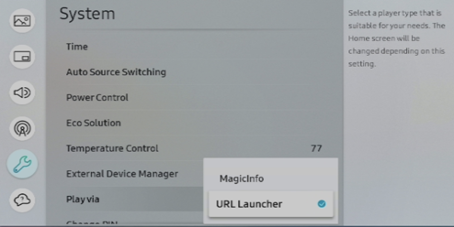
Step 2. Once in the menu of your device, go to System >> Play Via and set it as URL Launcher or Custom App
Next, we'll set up a connection to the MagicINFO server.
Step 3. In the menu of your device, go to Network >> Server Network Settings >> Connect to server.
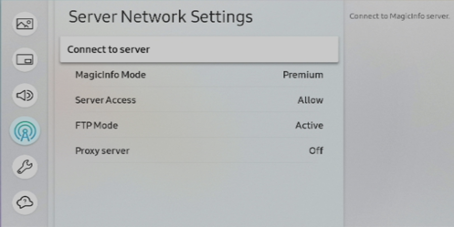
Step 4. Fill in the following details:
0 Server Address: rm.magicinfoserver.com
0 SSL/TLS: Use
0 Port: 7002
Step 5. Please send us your device's Wired MAC address, and we will connect this to your account. You can find your Wired MAC address via Menu >> Support >> Contact Samsung.
Comments
0 comments
Please sign in to leave a comment.